 "Image Credit: Firstpost | Mehul Reuben Das")
When Samsung launched the Galaxy S25 series, the spotlight wasn’t really that much on the hardware as much as it was on the revamped Galaxy AI, with all of its multimodality, and conversational features. Like with AI on smartphones, Samsung again has the first mover’s advantage in introducing agentic AI on a smartphone.
Naturally, AI features are a big deal for the S25 series. They’re front and centre, offering everything from smarter voice commands to photo editing magic. So, I decided to put the new AI tools to the test over the course of a week. Spoiler: I’ve had a mix of highs, lows, and a few quirks to get used to. Here’s my take on how Galaxy AI lives up to its promises.
A complete package, right from the start
Unlike Apple’s staggered rollout of its new AI features, Samsung gives us the full Galaxy AI experience right from the launch of the S25 series. This complete suite of features is designed to make your daily life smoother, with a strong emphasis on practicality rather than the flashier, more creative AI tricks we’ve seen from other companies.
And the best part? Most of these features work without needing an internet connection, meaning they operate on device and without sending stuff to the cloud, which is a real plus if you’re someone who’s cautious about privacy or just need to get stuff done while off the grid.
But as much as Samsung is all-in on AI, it’s not flawless. There are some quirks you’ll have to navigate, so let me take you through what I experienced.
Some old favourites, some upgraded gems
Before diving into the brand-new AI functions, it’s worth mentioning the features that made a return, but with some handy upgrades.
One that stood out was the generative photo editing tools. Moving or removing elements in your photos, or giving your selfies a makeover through the Portrait Studio, is now noticeably quicker. It might be down to the new Snapdragon 8 Elite chip in the S25 Ultra, or simply a software tweak, but whatever it is, the results are faster and smoother than the Galaxy S24.
Quick Reads
View AllThen there’s the Circle to Search feature, which debuted last year but has since received some useful improvements.
Now, the feature can listen to audio to help identify the source, and there’s a new addition called Gemini Talk Live. This tool lets you discuss a video or file with the AI more immediately through a voice chat, making it easier to search through and interact with your media.
Voice commands make Bixby the Jarvis it was meant to be
One of the most exciting updates is the smarter Gemini voice commands. They allow you to control multiple apps with a single voice command.
That’s a pretty big deal, especially if you’re someone who enjoys using different apps for your notes, calendar, or music. For example, you can ask Galaxty AI to set a calendar event for a birthday party, send you reminders via SMS, and share it with a bunch of people over WhatsApp or SMS.
In my experience, it didn’t always work as smoothly as I hoped. Sometimes, Gemini would stall mid-command, especially when I tried stringing too many requests together. Or, if I took too long to follow up on a command, it would assume I was done and process the first part only. But when it did work, it was pretty impressive—being able to add, edit, and delete calendar events or reminders hands-free is a big leap forward.
It’s still not faster than just manually typing or copying and pasting things, but it definitely beats older assistants that would struggle to manage even one task at a time.
Now Brief, the perfect tool to start & end your day
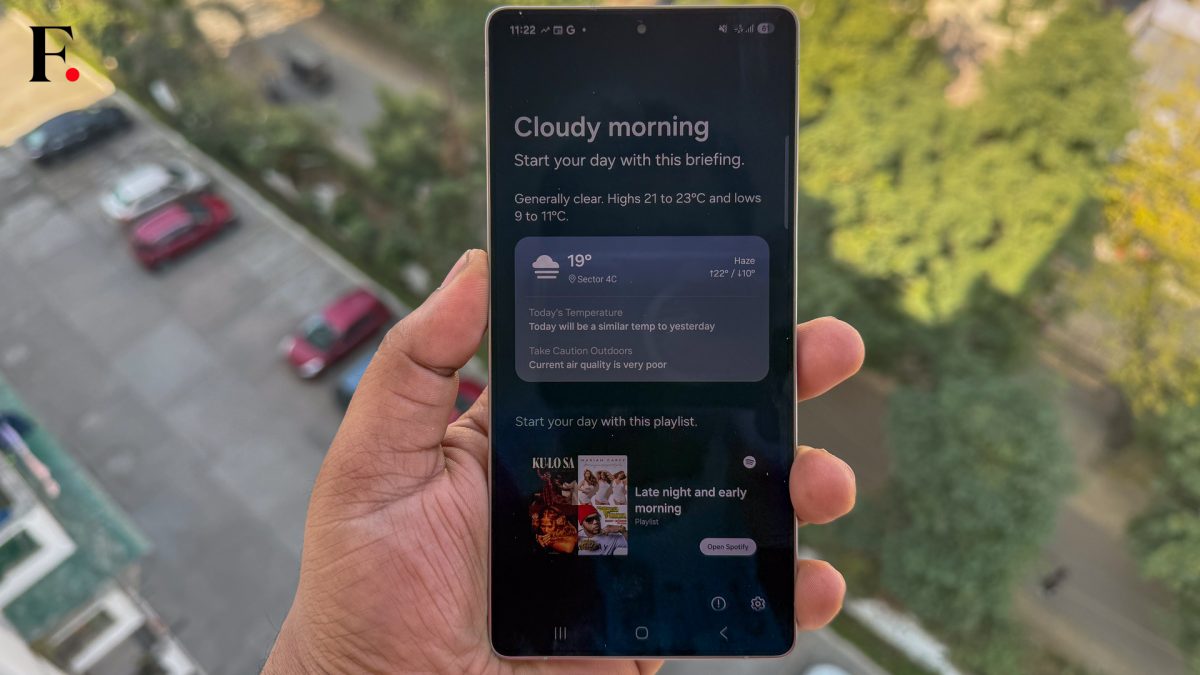
One feature I found particularly useful was the Now Brief, an automated update that appears on your lock screen or home screen widget. It pulls information from apps like Calendar and Weather and updates you on upcoming events, the weather, and more.
However, it’s only as good as the data you feed it. If you don’t fill out your calendar events with detailed information, like meeting locations, Now Brief won’t be able to help you plan your day as well. It’s also a bit geared toward driving—so if, like me, you rely on public transport, it might not suggest the best departure times. Still, for those who feed it the right details, it’s a useful little helper.
Conversational search
Galaxy AI’s search capabilities are also improved, especially when it comes to natural language processing. You can search your Gallery or Settings apps using phrases like “show me the photos I took at the beach last summer” and get more relevant results. It’s a real time-saver, but it’s not perfect.
While the Settings search can take you to the right spot, it won’t automatically toggle the settings for you, which feels like a missed opportunity.
Precision meets convenience in AI Select
One of the simpler, yet highly practical features, is AI Select. This new addition to the Edge Panel gives you precise control over what part of your screen you want to capture.
Whether you’re grabbing a snippet of text or selecting a specific section of an image or video, AI Select lets you do it all without needing to crop or trim later. It’s not flashy, but it’s incredibly useful for anyone who regularly needs to capture specific parts of the screen for work or play.
Audio Eraser a good idea, but needs optimisation
Then there’s the Audio Eraser, which promises to clean up video sound by removing background noise and amplifying speech. In practice, it works reasonably well but can be a little too aggressive, sometimes making voices sound unnatural. It’s a nice tool to have for quick edits, but it’s far from perfect.
Final thoughts on the new Galaxy AI
After a week of using the Galaxy S25 with its revamped AI features, I can confidently say that Samsung has made some impressive strides. There are definitely some quirky moments, but the overall package is solid. The AI tools are versatile and practical, and while they’re not without their flaws, they offer a much better user experience than previous generations.
As far as future updates go, it’s hard to say whether all these features will remain exclusive to the S25 series, but there’s a good chance that some of them will make their way to other Samsung devices. One thing’s for sure: if you’re already a Samsung user, the Galaxy S25 and its AI tools are definitely worth a look, even if you don’t use every feature to its full potential.
So, should you upgrade? Well, if you’re after a phone that’s smarter, more efficient, and capable of doing a little more with less effort, the S25 series with its Galaxy AI might just be the phone for you.